Figma Weave: What It Is, What It Costs and How to Use It
· 7 min read · by transjt.ai
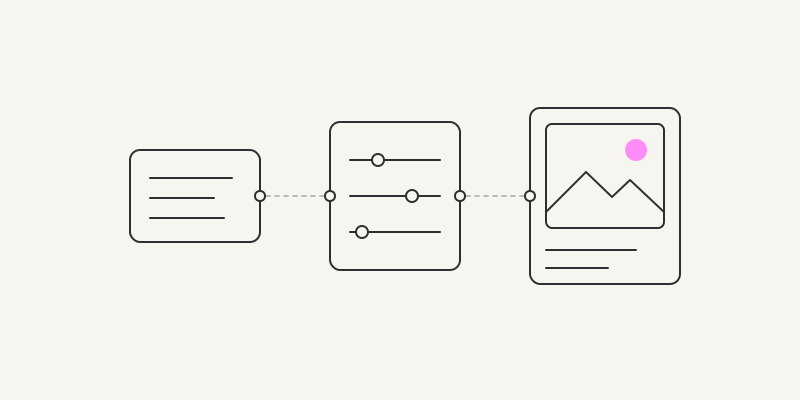
Short answer: Figma Weave is a node-based AI canvas for images, video, audio and 3D. Each step, a prompt, a model or an edit, is a node, and you wire nodes into a workflow you can run again. Figma bought it as Weavy in October 2025. It lives at weave.figma.com with its own plans and credits, and since 6 October 2026 its ready-made tools are generally available inside Figma Design. Below are its prices and a first workflow, and at the end how its images get onto a WordPress or HubSpot site.
- Made by: Weavy (Tel Aviv, founded 2024), bought by Figma on 30 October 2025 and renamed Figma Weave.
- Where: weave.figma.com in the browser; its tools also run in Figma Design under Tools.
- Price: free with 150 credits a month; paid plans from $24 a month. Billed separately from Figma.
- Models: image, video, 3D and audio models from Google, OpenAI, Black Forest Labs, ByteDance, Kuaishou (Kling), Runway and others, side by side.
- Output: images, video, audio and 3D files; no editable layouts.
What Figma Weave is
Weave puts many AI models and classic editing tools on one canvas. Instead of typing into one chat, you build a chain: a prompt node feeds an image model, its result goes through an upscaler, a background replacer and a crop, and an export node saves the files. Because the chain stays on the canvas, you can swap the model, change the prompt or feed it a new product photo and run it again.
Figma announced the purchase on 30 October 2025. It didn’t disclose the price; Israeli press reported $150–200 million. The product kept running on its own site, relaunched under the Figma Weave name in April 2026, and connected to Figma Design in stages: ready-made Weave tools in open beta from Config on 24 June 2026, generally available on 6 October 2026.
What Figma Weave costs
A paid Figma plan doesn’t include Weave. It has its own plans, and its credits are separate from Figma’s AI credits.
| Plan | Price | Credits a month |
|---|---|---|
| Free | $0 | 150; up to 5 workflows, no video models |
| Starter | $24 a month, or $202 a year | 1,500 |
| Professional | $45 a month, or $378 a year | 4,000, unused credits roll over |
| Max | $100 a month, or $840 a year | 10,000, unused credits roll over |
| Team | $42 per user a month, billed annually | 4,500 per user, in a shared pool |
| Enterprise | On request | On request |
Prices from weave.figma.com/pricing, checked on 17 November 2026. What a run costs depends on the model; every node shows its cost before you run it. Extra credits cost $10 for 1,000 on Starter, or $10 for 1,200 on the higher plans.
The Weave tools inside Figma Design work differently. They need a Professional, Organization or Enterprise plan and use your Figma AI credits, 13 to 110 credits a run.
Which models it has
Each model is a node, so one prompt can run through several models side by side in a Compare node. In October 2026 the list includes image models (GPT Image, Nano Banana, Flux, Ideogram, Seedream), Topaz for upscaling, video models (Seedance, Kling, Runway Aleph, Wan, LTX and others), 3D models (Meshy, Trellis, Tripo) and audio models. The list changes every few weeks.
Models marked Verified by Figma run under Figma’s contract with the provider: no training on your data, with indemnity. Unverified models fall under the provider’s own terms.
How to use Figma Weave, step by step
- Open Weave. Sign in at weave.figma.com (your Figma login works) and click Create new file, or duplicate one of the official templates from Figma Community.
- Add nodes. Press Tab on the canvas, use the menu on the left, or right-click and search.
- Add your inputs. A Prompt node for text, an Import node for images (or drag JPEG, PNG, HEIC or WebP files in), a CSV for a batch of prompts, or a pasted Figma frame, which becomes a Figma node.
- Wire them up. Drag from a node’s output to the next node’s input; only matching types connect.
- Run it. Model nodes have a Run button and spend credits, and so do AI edits such as Inpaint and Upscale; manual edits such as Crop or Blur are free.
- Iterate. Branch the chain, compare models, change the prompt, and keep the result you like.
- Export. Connect an Export node and choose a folder. Images come out as PNG or JPG.
- Make it a tool. Add an Output node and Weave builds a simple form for the workflow in the Tool tab. Share it with your team, or publish it to Figma Community with Share > Publish to Figma Community. On Figma Organization and Enterprise plans you can also publish it inside your company.
Weave inside Figma Design
You don’t have to leave Figma for common jobs. Over twenty ready-made Weave tools, such as Replace background, Transfer style, Change lighting, Generate mockup and Generate product variations, run right on the canvas: open Tools in the left navigation, filter by Weave, fill in the inputs, and click Generate. ⋯ > Open in Weave shows the workflow behind a tool.
The other way round, a Figma frame pasted into Weave becomes a Figma node. Wire generated images to its layers and click Connect to send them back; Figma asks you to review the update before it changes your design. Link your accounts first under Settings > Profile > Linked accounts.
Since 26 October 2026, AI agents can also call Weave’s image and video models through the Figma MCP server, with a paid Weave plan and your Weave credits.
What web designers use it for
- Hero images: generate, outpaint to the layout’s proportions, upscale.
- Illustrations in one style across a whole site.
- Product shots: relight, swap the background, generate variations.
- The same visual as 1:1, 9:16 and banner versions for social posts and ads.
- Short product loops for a hero or a feature section.
Limits to know
- A second subscription: Weave credits and Figma AI credits are separate, and Figma itself calls it “not the most seamless setup”.
- Many models to choose from; picking the wrong one spends credits for nothing, and video uses them fast.
- The Free plan has no video models and no extra credits.
- Weave makes images and clips. It doesn’t make layouts or editable UI.
- Weave promises full commercial rights, but they still depend on the model, so check a model’s status in Figma’s Trust Center before you use its output in a campaign.
From Weave to a WordPress or HubSpot site
1. Single images and clips
- Export images from Weave as PNG or JPG.
- Convert images to WebP at about twice the size they appear on the page; our free PNG to WebP converter does it in your browser.
- Write alt text for each one, or let the alt text generator draft it.
- Upload them to the WordPress media library or HubSpot’s file manager. Use MP4 for clips, muted, with a poster image.
2. A whole page or site
Put the images where they belong in your Figma design, by hand or with the Figma node and Connect. Then export the design with the transjt Figma plugin as a native HubSpot theme with drag-and-drop modules, or as a WordPress theme with real PHP templates, so your marketing team can change the pictures later without a designer.
Frequently asked questions
Is Figma Weave free?
Yes, with 150 credits a month, up to five workflows and no video models. Paid plans start at $24 a month.
Is Figma Weave included in a Figma plan?
No. Weave is billed separately and its credits are separate. Only the ready-made Weave tools inside Figma Design use your Figma AI credits, on Professional plans and up.
Is Figma Weave the same as Weavy?
Yes. Figma bought Weavy in October 2025 and renamed it Figma Weave.
Which AI models does Figma Weave use?
Image, video, 3D and audio models from Google, OpenAI, Black Forest Labs, ByteDance, Kuaishou (Kling), Runway and others. The list changes often.
Can I use Figma Weave images commercially?
Weave says its plans include commercial rights, but they depend on the model. Check the model’s status in Figma’s Trust Center first.
Can Figma Weave design a website?
No. It makes images, video, audio and 3D. Design the pages in Figma, place the images there, and convert the design into a HubSpot or WordPress theme with transjt.