Google Stitch to HubSpot — From a Prompt to Editable Modules.
Google Stitch turns a prompt into high-fidelity screens in seconds. transjt turns those screens into a native HubSpot theme. You copy the design to Figma and run the transjt plugin, and your marketing team can then edit real HubL modules instead of looking at a picture of a website.
Payment after Preview
Trusted by agencies, freelancers and marketing teams

















When to take a Google Stitch design to HubSpot
Six situations where a Stitch draft should become a HubSpot site rather than stay a prototype.
The Stitch draft won the meeting
Stitch is built for getting from an idea to convincing screens fast. Once the client or the team says yes, the screens need to become pages, and a prototype tool doesn't take you that far.
The screens are there. The site is not.
A prompt gives you a landing page, a pricing page and a blog layout in one sitting. Turning each of them into templates and modules by hand would take longer than designing them did.
You want the design, not the downloaded code
Stitch can download its screens as HTML and CSS, but that is a static front end with nothing a marketer can edit. Copied to Figma as layers, the same design becomes the source transjt builds the theme from.
Nobody on the team writes HubL
HubSpot's templating language is used nowhere else, and learning it just for one site isn't worth the time. transjt writes the HubL, so the conversion needs no HubSpot developer.
Marketing builds the next pages itself
As HubSpot modules with editable fields, the sections Stitch designed become building blocks the marketing team assembles into new pages, without going back to the prompt.
The site should sit where the CRM already is
If you keep contacts and email in HubSpot and do your reporting there, a native theme puts the pages in the same portal as that data, next to your forms, lists and attribution.
How many sections did Stitch design?
Get your build live with transjt
- Save money
- $8,100*
- Save time
- 81 hours*10.1 workdays by hand
- Get your results fast
- 1.5–3 hours*for the whole theme
*An approximate estimate based on manual Figma-to-HubSpot build time: about 4.5 hours per component at $100 an hour, in 8-hour workdays. transjt builds the theme in about 1.5–3 hours.
What our clients say.

“We’d seen plenty of tools promise magic for page and theme creation, but they always under-delivered. Transjt proved to be the exception.”
KevinThinkFuelWe’d seen plenty of tools promise magic for page and theme creation, but they always under-delivered. Transjt proved to be the exception.
Transjt made importing designs from third parties effortless. … Their support made a complex process simple and stress-free.
What would have traditionally required weeks of custom development was completed in just a few days with minimal adjustment.
Great tool that can take your designs into Hubspot in matter of minutes! Love it!
This tool is amazing! It saved me hours of manual coding by converting my Figma designs into clean, responsive layouts.
Turning the Figma design of our new website into a HubSpot webpage was extremely smooth and fast. Saved many hours - if not days - of coding time. Easy and rapid iterations.
The Figma to HubSpot conversion is fast and accurate. It saves hours of manual development when creating HubSpot modules and keeps excellent visual fidelity to the original design.
We’re using it to automate all the drag and drop modules. It’s working very well and we’ve been able to create modules with a high degree of customization.
Easy onboarding and has a great UI. Importing is fast, and the AI enhancements are decent. Good price. Easy to integrate as well.
Very precise design export, and really useful because components don’t get exported as images.
Great tool to export fast design to WordPress.
Once you understand how the system works, transjt becomes a very efficient tool that significantly improves both workflow speed and quality scalability. The support team is responsive and helpful.
- 95–99%of the finished code, on a well-structured file
- ∞AI builders to import from, plus Figma
- 2native CMS targets: HubSpot and WordPress
- 1 clickto export. A couple of minutes later the theme is in your account
Take a Google Stitch design to HubSpot in four steps.
From your Google Stitch design to a native HubSpot theme, by way of Figma.
- 01Google Stitch
Design in Google Stitch
Describe the page, or start from a site whose look you like, and let Stitch generate the screens. Iterate until the layout is right; treat the first result as a draft.

- 02
Copy it to Figma
Send the design to Figma as editable layers. Group the sections into frames and check Auto Layout, because transjt reads the Auto Layout settings to make the theme responsive. More on preparing your Figma file.
- 03

Run the transjt plugin
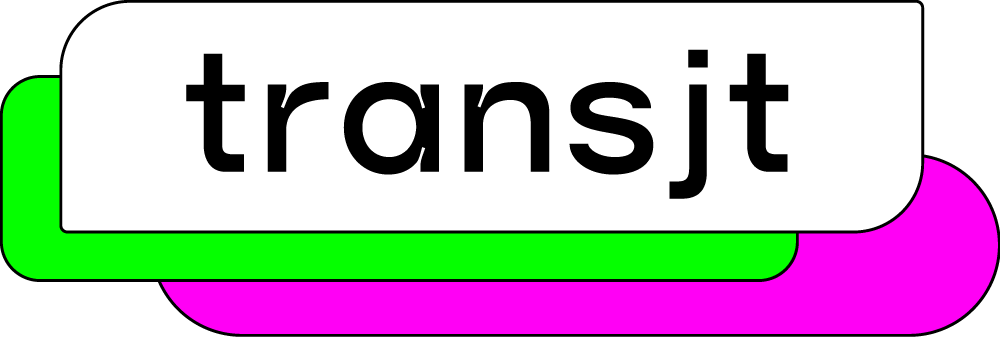
Select the frames and send them to transjt. It turns each section into a HubSpot module with editable fields and shows you a live preview before anything is exported.

- 04

Export to HubSpot
Connect your portal once and export. transjt writes a native theme into the design manager; your team builds pages from its modules in the drag-and-drop editor.
Built it with an AI builder instead?
All AI builders on one page: AI to HubSpot.

Ready to turn your Stitch design into a HubSpot theme?
What a Google Stitch to HubSpot theme actually contains
Before a marketer can change a word of a Stitch design, HubSpot needs templates and modules with declared fields. transjt builds those templates and modules from the Figma file. Each section becomes one module with its copy, images and links as fields, and the colours and type go into the theme's settings. The result is a theme you can read and review.
The whole workflow, step by step: Design in Google Stitch, export to HubSpot. Building for WordPress instead? Design in Google Stitch, export to WordPress.
For corporates, agencies and freelancers.
Google Stitch to HubSpot FAQ.
What to expect when a Google Stitch design becomes a HubSpot theme.
Book a demoNo. Stitch exports to Figma or as front-end code; neither is a HubSpot theme. transjt picks up the design in Figma and turns it into HubL templates and modules.
The code export is a static front end made of HTML and CSS, with nothing a marketer can edit. The Figma layers keep the design's structure, which is what transjt needs to build modules with editable fields.
A little. Group the sections into frames and check Auto Layout; that is what makes the theme responsive. A tidy file converts faster and needs less polishing afterwards.
Yes, and that is the point of converting the design instead of embedding it. Copy, images and section order are all changeable in HubSpot's drag-and-drop editor without touching the design.
Uploading a custom theme requires a Content Hub tier that permits custom coded files; Starter tiers restrict this. Check your tier before scoping the work, because this is the one hard prerequisite.
Once the design is in Figma, transjt typically has your HubSpot theme ready within a few hours, depending on the number of sections.
Design your website today, launch tomorrow.
At transjt, every second counts. That’s why our mission is simple: save you time and remove friction from your workflow.