
In early October 2026, a small team called ArtCraft put seven free, open-source rebuilds of Adobe's best-known apps on GitHub, written in Rust with heavy help from AI. Tech sites from PetaPixel to The Register covered it within days. On 9 October came the eighth: FigCraft, a clean-room rebuild of Figma.
So is this the end of the subscription design stack? We read the code, the roadmap and the coverage.
Short answer: not yet, and FigCraft says so itself. It's an impressive early alpha. It's free, it runs offline, and it already covers most of Figma's core editor. By its own estimate, though, it's only about halfway to being ready for real work. Figma files open only on a best-effort basis, multiplayer is a preview, Figma plugins don't run, and there are no AI features. It's worth trying today. It isn't yet a safe place for client work.
Source: https://github.com/storytold/figcraft/blob/main/docs/images/shot-1-hero.png
What is FigCraft?
FigCraft is an interface design and prototyping app from ArtCraft. In its own words, it's a "clean-room reimplementation" of collaborative design workflows. The ArtCraft team built it from Figma's public documentation and its observed behaviour, without using Figma's code, file formats, icons or images.
The key facts, as of 19 October 2026:
- Price: free and open source, under the MIT or Apache-2.0 license
- Platforms: native apps for macOS, Windows, Linux and FreeBSD, plus a browser version
- Technology: 100% Rust, with its own renderer, with no Electron and no web view
- Privacy: no account and no telemetry; files are plain
.figcraftarchives on your own disk - Status: early alpha. The GitHub repository was created on 9 October and had shipped seven releases by 18 October (v0.7.0).
- Traction: about 2,800 GitHub stars and 1,000 forks in its first ten days
ArtCraft is the company of developer Brandon Thomas, who is named in the press coverage of the Adobe rebuilds. It started as an AI image and video studio, and the "Crafting Apps" are its new line of free creative tools. FigCraft itself already has contributors from the community.
Watch out for copycat sites. Searching for FigCraft turns up a dozen download sites that aren't ArtCraft's. The official sources are the GitHub repository and getartcraft.com.
The bigger story: seven Adobe apps, rebuilt with AI
FigCraft is the newest of the Crafting Apps. The first seven went after Adobe:
| ArtCraft app | Rebuild of | What it's for |
|---|---|---|
| PhotoCraft | Photoshop | Image editing |
| VectorCraft | Illustrator | Vector illustration |
| FilmCraft | Premiere Pro | Video editing, colour and sound |
| LightCraft | Lightroom | Photo library and raw development |
| PdfCraft | Acrobat | Reading, organising and protecting PDFs |
| EffectCraft | After Effects | Motion graphics and visual effects |
| DesignCraft | InDesign | Page layout and publishing |
| FigCraft | Figma | Interface design, components and prototypes |
What made headlines was the method more than the apps. According to PetaPixel, the developer used Anthropic's Claude Opus 5.5 to write them, and FigCraft's own roadmap estimates its remaining work in AI agent hours. PhotoCraft passed 68,000 GitHub stars in under three weeks. ArtCraft has since added clones of Word, Excel and PowerPoint, which The Register described as not ready for production.
Every one of these apps is labelled alpha. The question isn't whether they replace Adobe or Figma today. It's how far they've come in a few weeks, and what that means for paid design software.
What FigCraft already does well
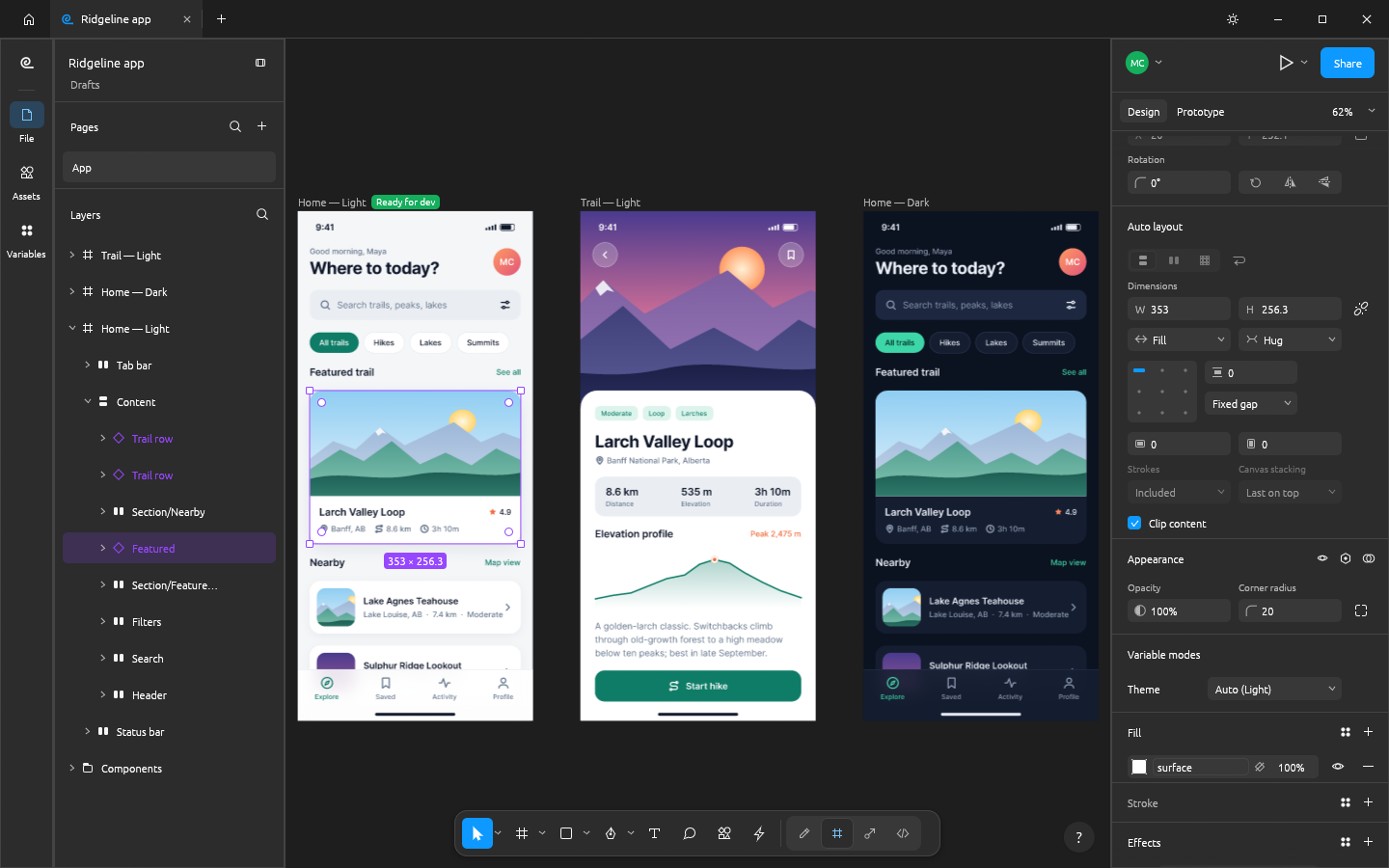
Opening FigCraft feels deliberately familiar: the toolbar, layers panel, Design panel, menus and shortcuts all sit where a Figma user expects them. Behind that sits a surprisingly complete core editor:
- Auto layout in both directions, with wrap and grid, Hug, Fill and Fixed sizing, plus constraints and layout grids
- Components and variants, with instance overrides that survive edits, an Assets panel, and styles and variables with modes for light and dark themes
- Vector networks, with the pen and pencil, a shape builder, editable booleans and variable-width strokes
- Prototyping, with connections, Smart Animate-style transitions, variables with conditions, flows and a presentation view
- Dev Mode, with ready-for-dev status, annotations, measurements, and generated CSS, HTML, React, SwiftUI and Compose code
- Comments and version history, including branches
Two things set it apart from Figma rather than copying it:
- It works offline and stays private. There's no account and no cloud. Nothing leaves your computer until you choose to share a file.
- It's built for AI agents. Every menu item, tool and drag is one of more than 400 commands. The same commands run from the app, a command-line tool, a JSON control channel and a built-in MCP server, so an agent like Claude Code can create and edit designs directly. FigCraft's own parity notes say that for agents, it's already ahead of Figma.
Where FigCraft falls short
The FigCraft team is unusually candid about the gaps. Its roadmap measures the distance to Figma area by area:
- About half ready. The team rates FigCraft about 53% of the way to being ready for real work, and about 50% for a mainstream designer's weekly tasks.
- Figma files are best effort.
.figfiles open, but the import hasn't been checked against real design documents. Saving back to.figis experimental. - Collaboration is a preview. Live sessions work, but there are no accounts, teams or cloud yet, and the code or link is the access. The public sharing server stores files unencrypted and makes no backup or uptime promises.
- Figma plugins don't run. FigCraft has its own plugin system, but no public plugin catalogue and no community files.
- There are no AI features. First drafts, layer renaming and image editing are all at 0%. Figma's separate products, FigJam, Slides, Sites and Make, are out of scope.
For a solo designer, most of that is acceptable. For a team that shares files with clients every day, it rules FigCraft out for now.
So, is FigCraft a Figma killer?
It depends on who you are:
| You are… | Verdict today |
|---|---|
| A student, hobbyist or solo designer | Try it. It's free, fast and familiar, and the core editor is there. |
| A developer or AI tinkerer | Try it now. The CLI and MCP server make it the most scriptable design tool around. |
| A design team | Not yet. You need accounts, reliable multiplayer and file exchange first. |
| An agency with client handoffs | Not yet. Clients send .fig files and expect Figma links. Keep client work in Figma. |
The bigger shift is what FigCraft proves. A credible Figma-like editor appeared in days, not years. Even if FigCraft never reaches full parity, that puts pressure on what a design tool can charge for, and pushes the value toward what happens after the design.
And is ArtCraft an Adobe killer?
It's the same picture with a bigger target. Adobe's moat isn't the menu items, which ArtCraft can now copy quickly. It's decades of professional workflows, file formats, colour management, plugins and training, and that takes longer to rebuild than an interface. Right now, all seven Adobe rebuilds are alpha software.
What ArtCraft has already changed is the price conversation. A free, open-source, AI-built alternative that's "good enough" for many everyday tasks is a new kind of competitor for subscription software.
What this means for getting a website live
Whichever tool wins, a design file still isn't a website. FigCraft's Dev Mode generates code for a component or a frame, but not a website your marketing team can edit in a CMS. That gap is the same as with Google Stitch or Claude Design.
There are three routes from a new design tool to a live HubSpot or WordPress site:
- Keep the final file in Figma. The transjt plugin runs inside Figma, and FigCraft doesn't run Figma plugins. If you sketch in FigCraft, move the final design to Figma and export it from there to HubSpot or WordPress.
- Save a
.figcopy (experimental). FigCraft can save a.figcopy, which you can then import into Figma. The export is experimental, so check components, variables and auto layout in Figma before you export. - Go through code. Let an AI agent such as Claude Code use FigCraft's MCP server and generated React code to build the site as a React project with Vite, without server-side rendering. Push it to GitHub, and transjt turns the repository into a native HubSpot or WordPress theme.
We haven't tested a FigCraft project end to end with transjt yet. Routes 2 and 3 are where we'd start, and we'll update this post once we have.
Verdict
FigCraft isn't a Figma killer today, and ArtCraft isn't an Adobe killer yet. Both are early alphas, and both say so honestly. They're still one of the most important design-tool stories of 2026, because they show how quickly AI can rebuild software that took years to write.
For your next client website, keep using the tools your team and clients already share. For your next side project, try FigCraft. Whichever tool designs the site, the step that makes it a website your team can run is the same: turning the design into a native theme in a CMS.